

Maintaining version compatibility during updates
Each time you update any of the components in an HPE Synergy environment, you must consider the compatibility of the original and updated version of that component in relation to all the other components in the environment. No part of the environment must ever be updated to a version that is incompatible with any other part of the environment. When planning an update, you may need to plan additional steps to achieve the required result while maintaining compatibility.
In the following examples, lines are drawn between HPE Synergy Management combinations and HPE Synergy Custom SPPs that are compatible with each other. The designations shown, like "MC1" and "SV2" are meant to represent individual version numbers of those particular components. This figure is an example and does not represent any actual version compatibility. For information on supported version compatibility, see the HPE Synergy Software Releases website at https://www.hpe.com/info/synergy-sw-release-information.
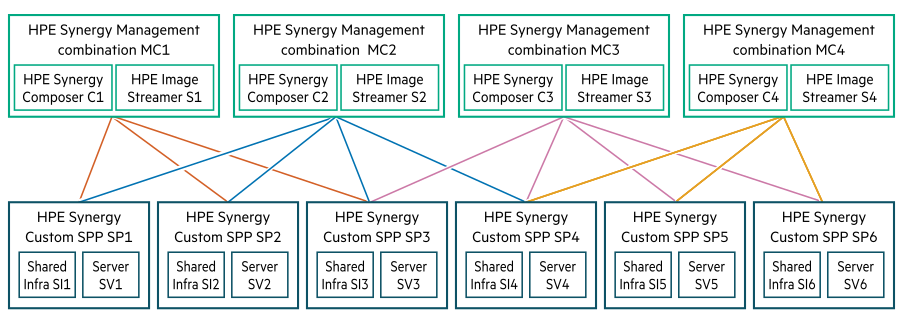
Example 1
You are running HPE Synergy Management combination version MC1 and HPE Synergy Custom SPP version SP1. You want to upgrade your appliances to HPE Synergy Management combination version MC2.
As versions MC1 and MC2 are both compatible with version SP1, you can update directly to version MC2 while remaining on version SP1. Perform the following steps:
Update the Composers to version MC2.
Update the Image Streamers to version MC2.
Example 2
You are running HPE Synergy Management combination version MC2 and HPE Synergy Custom SPP version SP1. You want to upgrade to your appliances to HPE Synergy Management combination version MC3. You cannot update directly to version MC3 as it is not compatible with version SP1. You must first update the HPE Synergy Custom SPP to a version that is compatible with both versions MC2 and MC3. In this case, version SP3 is compatible with both. Perform the following steps:
Update all the managed devices to version SP3.
Update the shared infrastructure firmware to version SP3.
Update the server firmware and drivers to version SP3.
Now your devices are running version SP3, so you can safely update your appliances to version MC3.
Update the Composers to version MC3.
Update the Image Streamers to version MC3.
Example 3
You are running HPE Synergy Management combination version MC1 and HPE Synergy Custom SPP version SP1. You want to upgrade your managed devices to HPE Synergy Custom SPP version SP2.
As versions SP1 and SP2 are both compatible with version MC1, you can update directly to version SP2. Perform the following steps:
Update the shared infrastructure firmware to version SP2.
Update the server firmware and drivers to version SP2.
Example 4
You are running HPE Synergy Management combination version MC1 and HPE Synergy Custom SPP version SP2. You want to update your managed devices to HPE Synergy Custom SPP version SP4. You cannot update to version SP4 as it is not compatible with version MC1. You must first update the HPE Synergy Management combination to a version that is compatible with both versions SP2 and SP4. In this example, version MC2 is compatible with both. Perform the following steps:
Update the appliances to HPE Synergy Management combination version MC2.
Update Composers to version MC2.
Update Image Streamers to version MC2.
Now your appliances are running version MC2, so you can safely update your managed devices to version SP4.
Update the shared infrastructure firmware to version SP4.
Update the server firmware and drivers to version SP4.